

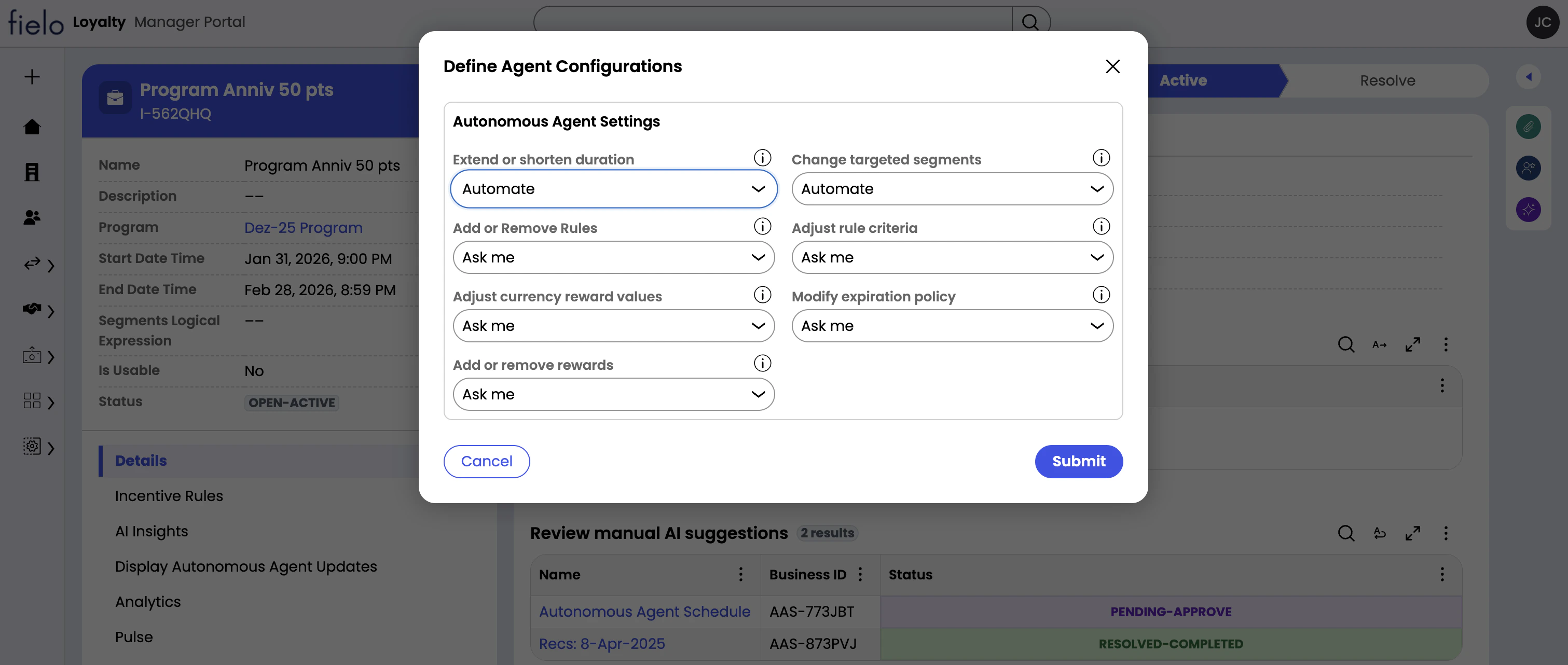
Optimization Types
- Extend or shorten duration: AI can change the incentive start date and end date.
- Adjust currency reward values: When currency rewards are being given, reward values can be changed. If no currency rewards are being given, no optimizations of this type are made.
- Modify expiration policy: When currency rewards that expire are being given, the expiration policy can be modified. Currency rewards that don’t expire are excluded from this type of optimization.
- Add or remove rewards: AI can add or remove currency rewards and instant rewards.
- Adjust rule criteria: AI can make changes to the comparators and values of existing rule criteria, but not source fields. For example, AI can change the criterion
Total Amount > 100toTotal Amount >= 150, but cannot change the “Total Amount” field to different one. - Change targeted segments: AI can add and remove segments to and from the incentive.
Trust Levels
- Off: No autonomous activity of this type permitted.
- Ask Me: Ask for approval for activities of this type. When AI recommends an activity of this type, all registered Loyalty Managers are informed by email. The activity can be approved or rejected on the AI Suggestions for Manual Review table on the corresponding incentive page.
- Automate: AI is free to execute activities of this type autonomously.