

Expiration
Positive ledger entries can, optionally, be set to expire. Each entry has its own date and time of expiry. A ledger entry’s expiration date and time are defined by the artefact which generated it, such as an incentive rule or a balance adjustment. When a ledger entry expires, all of its available (unconsumed) balance is zeroed out and recorded in the Currency Expired column. A new, negative ledger entry of type “Expiration” is created to deduct the expired amount from the now-expired positive entry.Attributes
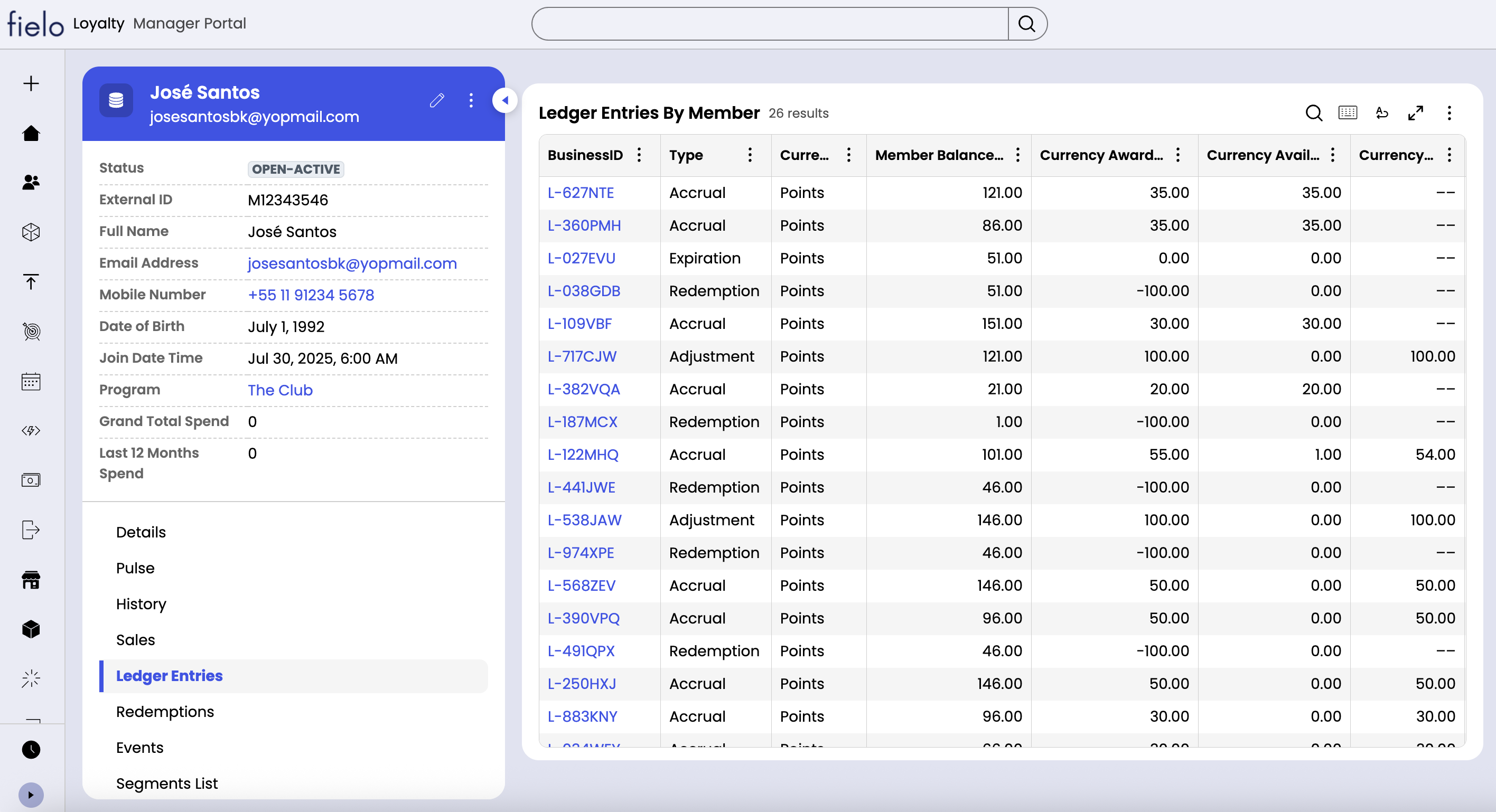
Ledger entries have the following attributes:- Type: Accrual means a positive entry resulting from the processing of an incentive rule. Redemption means a negative entry resulting from a member redeeming currency for a reward. Adjustment means a manual addition or removal of currency by an admin. Expiration means a negative entry resulting from the expiration of an accrual or positive adjustment.
- Member: The member whose balance was updated.
- Currency: The currency corresponding to the balance that was updated.
- Incentive Rule: If the entry is an accrual, this is the incentive rule which generated it.
- Sale: If the entry is the result of an incentive rule on Sale, this is the corresponding sale.
- Event: If the entry is the result of an incentive rule on Event, this is the corresponding event.
- Redemption: If the entry is of type “Redemption”, this is the corresponding redemption.
- Expiration Ledger Entry: If the entry is of type “Expiration”, this is the positive entry whose remaining balance has been expired.
- Member Balance Snapshot: The resulting balance of the member immediately following the insertion of this entry.
- Currency Awarded: The amount of currency added or removed.
- Currency Available: The amount of currency still available for use (i.e. not already used or expired). For negative entries, this will always be 0.
- Currency Used: The amount of currency that the member has used, such as in redemptions. For negative entries, this will always be blank.
- Currency Expired: The amount of currency that was consumed due to expiration. For negative entries and positive entries prior their expiration date, this will be blank.
- Create DateTime: The date and time at which the entry was inserted.
- Expiration Date Time: The date and time at which the positive entry is set to expire. If blank, either the entry is a deduction or it does not expire.
Statuses
Ledger entries can be in one of three statuses:- Open-Available: The entry is positive, has available balance and does not have an expiration date.
- Open-AvailableWithExpiry: The entry is positive, has available balance and has an expiration date in the future.
- Resolved-Expired: The entry is positive and any unused balance has been expired.
- Resolved-Closed: The entry is negative (redemption, expiration or negative adjustment) or the entry is positive and completely consumed.