

Processing
Standard redemptions are inserted through the API by an external system, such as a web service connected to your member experience, or administratively via the UI. Redemptions resulting from instant rewards are generated internally during incentive rules processing. When a redemption is created, the member’s currency is immediately deducted, when applicable. If the member has insufficient balance, an error will be thrown. It then enters a queue which is cleared on a first-in, first-out basis. While the redemption is still in the queue, the member cannot make any additional redemptions. Once cleared, the redemption and its items are ready for use.Currency Usage Trace
On standard redemptions, you can verify which positive ledger entries were consumed in order to satisfy the redemption. To do so, go to the Ledger Entries list on the redemption detail page. Click on the business ID of the negative ledger entry, and then go to its Redemption UsageTrace list. There, you will see the list of positive ledger entries that satisfied the redemption alongside their respective amounts consumed.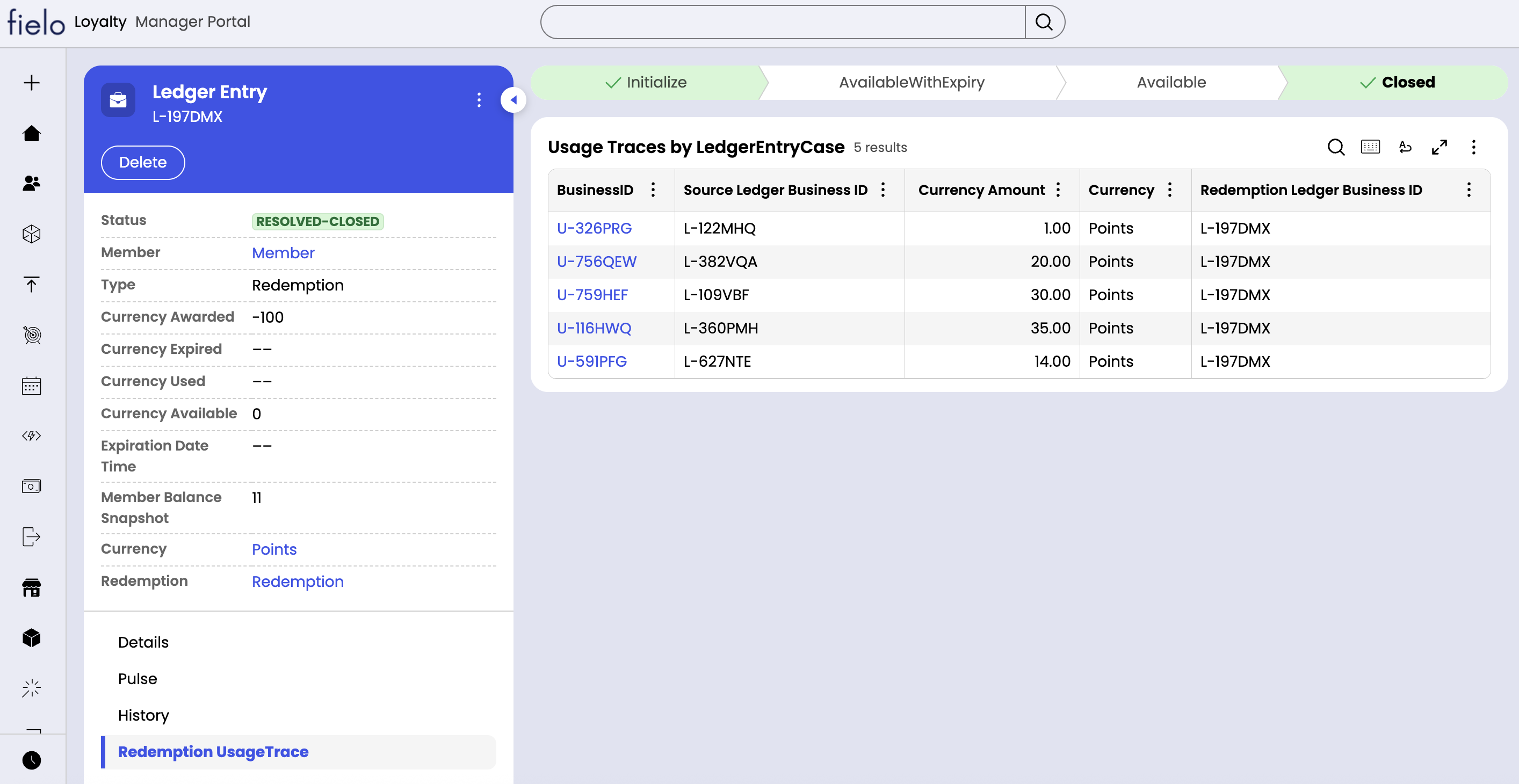
Redemption Items
Each redemption item corresponds to a reward that the member acquired, which can include a voucher code and an expiration date. An item can be used up to its expiration date, after which it’s marked as expired. A redemption item can be used as follows:- Lock: Locking signals that the member has begun the process of “burning” (or using) the redemption item, enabling you to prevent attempts at multiple simultaneous uses.
- Unlock: If the attempt to use is aborted, the redemption item can be unlocked so that a new attempt can be made in the future.
- Use: An item, once locked, can then be marked as used.
Attributes
Standard redemptions can be created administratively from the Redemptions page. Redemptions have the following attributes:- Member: The member who made the redemption (or got the instant reward).
- Program: The member’s program.
- Origin: If the redemption results from an incentive rule (i.e. instant reward), this will indicate “Business Rule”.
- Source Data Type: If the redemption results from an incentive rule (i.e. instant reward), this will indicate the data type of that rule.
- Items: The number of items that the redemption contains.
- Redeemed Currency: The amount of currency that was consumed by the redemption. This does not apply to redemptions resulting from incentive rules.
- Redemption Date Time: The day and time that the redemption took place.
- Redemption: The redemption to which the item belongs.
- Reward: The catalog reward corresponding to the item.
- Quantity: The quantity of reward redeemed.
- Is Instant Reward: Indicates “Yes” if the item resulted from an incentive rule (i.e. instant reward), and “No” otherwise.
- Voucher Code: The code that is provided to the member to facilitate the fulfillment process. It is optional. If needed, it must be provided on insertion of the redemption. For instant rewards, it will always be blank.
- Create DateTime: The date and time at which the item was inserted.
- Expiration Date Time: The date and time at which the item is set to expire. Upon expiration, the item can no longer be used. If blank, the item does not expire.
Statuses
Redemptions can be in one of four statuses:- Open-Ready To Process: The redemption has been created and is in the processing queue. Currency has already been deducted, if applicable.
- Pending-Process Redemption: The redemption is being processed.
- Pending-Redeem: The redemption has been processed. There are one or more redemption items that are available for use.
- Resolved-Completed: All redemption items have either been used or expired.
- Open-Available: The item is available for use and does not have an expiration date.
- Open-Available With Expiry: The item is available for use and has an expiration date in the future.
- Open-Locked: The item is locked. It can be marked as used or unlocked. If unlocked, the status returns to “Open-Available” or “Open-Available With Expiry”.
- Resolved-Completed: The item has been marked as used.
- Resolved-Expired: The item was not marked as used before reaching its expiration date.